HTML tables
Create tables with merged cells, grouped headers, and captions through a visual editor.
- New table: run Patches: Insert HTML table.
- Existing HTML table: hover it and choose Edit table, or run Edit HTML table with the cursor in its source.
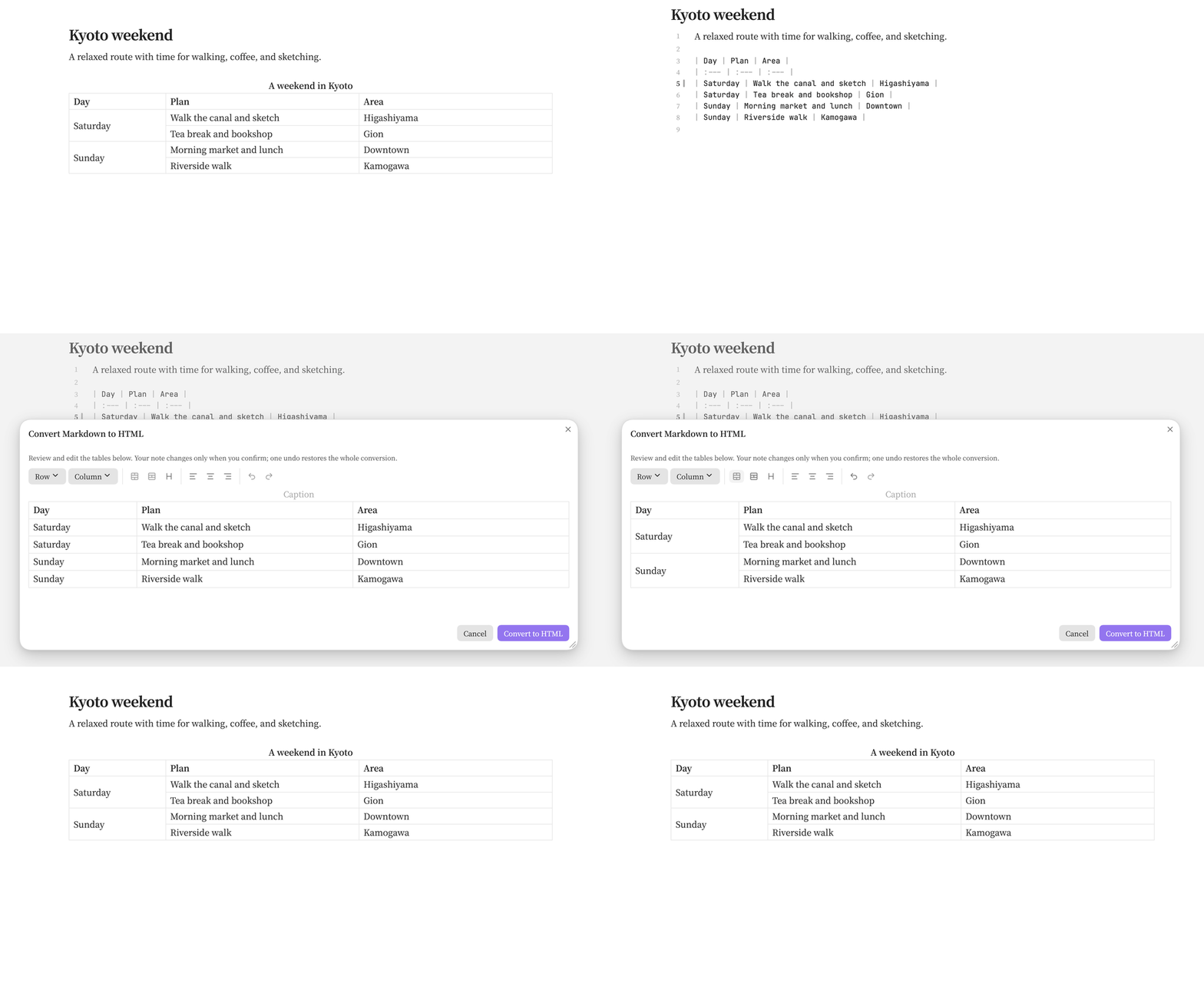
- Markdown table: place the cursor inside it, then run Convert Markdown tables to HTML from the command palette or editor context menu.
Try converting this table:
| Day      | Plan                      | Area        |
| :------- | :------------------------ | :---------- |
| Saturday | Walk the canal and sketch | Higashiyama |
| Saturday | Tea break and bookshop    | Gion        |
| Sunday   | Morning market and lunch  | Downtown    |
| Sunday   | Riverside walk            | Kamogawa    |
Review the preview, drag across cells or Shift-click to select a range, then use Merge cells, Split cell, the row and column menus, or alignment controls. Edit the caption above the table. Choose Convert to HTML to apply the result; Cancel leaves the note unchanged.
Select several complete Markdown tables to convert them together. Previous table and Next table switch between drafts, and Convert all N tables writes the batch in one undo step. Conversion preserves headers, alignment, common inline formatting, and links. Tables in code blocks, lists, or callouts are excluded. Images, embeds, footnotes, and excess cells are rejected before anything is written.
Convert tables with inline formulas
Patches 0.5.1 preserves $...$ in table headers and body cells. The table editor shows editable TeX. Obsidian typesets it in Reading View, and Patches enables the same rendering in Live Preview.

Paste this table into an Obsidian note, run Convert Markdown tables to HTML, and enter “Vector operations” in the caption field to match the screenshot.
| Operation | Formula for $u$ and $v$ | Example |
| :--- | :--- | :--- |
| **Length** (`norm`) | $\lVert v\rVert = \sqrt{v_1^2 + v_2^2}$ | $\lVert (3,4)\rVert = 5$ |
| **Dot product** (`dot`) | $u^\top v = u_1v_1 + u_2v_2$ | $(1,2) \cdot (3,4) = 11$ |
| **Projection** (`proj`) | $\operatorname{proj}_v u = \frac{u^\top v}{v^\top v}\,v$ | $u=(2,3)$ onto $v=(1,0)$ gives $(2,0)$ |
Edit an HTML table
In the editor, Tab moves between cells, Enter adds a line within a cell, and Escape leaves the cell. Pasting inserts plain text with its line breaks; Mod+Z and Mod+Shift+Z undo and redo edits. Save or Mod+Enter applies HTML-table edits. Untouched cell markup is preserved, and conflicting source changes prevent saving. Tables inside callouts and blockquotes are not detected for editing.
Both table and callout editors resize from their bottom-right corner and remember the size. Double-click the corner to reset.
Related reference
See commands for the three table actions, and troubleshooting if a table cannot be converted.